PBL Content Authoring & Management System

PBL 콘텐츠
출제 관리시스템

동료학습 및 커뮤니티학습에 사용되는 PBL 콘텐츠의 출제와 제작 과정을 체계적으로 관리하세요. 프로젝트형 과제 템플릿부터 역량 설정, 세부 미션 분할, 평가 루브릭까지 완성도 높은 콘텐츠 제작을 위한 통합 환경을 제공합니다.

핵심 기능

PBL 과제 설계부터 검증, 제작 진도 관리까지 출제자에게 최적화된 올인원 도구 모음입니다.

1. 프로젝트형 과제 등록 관리

학습자가 수행할 "프로젝트형 과제"의 표준 템플릿을 제공합니다. 가이드 라인을 따라 빈칸을 채워가다 보면 자연스럽게 완성도 높은 PBL 과제가 설계됩니다.

2. 역량 기준 등록 관리

프로젝트를 통해 습득할 역량을 손쉽게 등록 및 편집합니다. AI 기술을 다루는 "AI활용역량", 해결 및 기획의 "AI활용스킬", 업무 성공을 돕는 "AI업무역량" 3대 축으로 매핑됩니다.

3. 세부 미션 등록 관리

난이도가 높은 프로젝트를 단계별로 수행할 수 있도록 세부 미션으로 분할하여 설계합니다. 반복 미션 수행을 통해 설계된 역량 수준을 체계적으로 레벨업합니다.

4. 평가지 통합 관리

미션 수행 결과물을 평가하기 위한 Rubric 평가지 질문을 구성합니다. 학습자와 평가자가 활발한 질문과 대화를 주고받으며 스스로의 강약점을 명확하게 확인합니다.

5. 제작 진도 통합 관리

출제 과제별로 To-do, Draft, Reviewed, Done의 4단계 상태(Life-cycle)를 부여합니다. 통합된 제작 대시보드를 통해 다수의 과제 진행 현황을 직관적으로 확인하고 관리합니다.

6. 실시간 미리 보기

과제 및 미션 작성 중, 출제자는 즉각 미리보기를 활성화할 수 있습니다. 삽화 이미지나 동영상 등이 학습자 시점 화면에 깨짐 없이 올바르게 출력되는지 바로 확인합니다.

PBL 콘텐츠 제작 워크플로우

과제 기획부터 역량 매핑, 세부 미션 분할, 미리보기 검증 및 대시보드 상태 관리까지 일련의 출제 프로세스입니다.

📝
1. 프로젝트 과제 등록
표준형 프로젝트 등록
🎯
2. 역량 기준 매핑
하드/활용/업무역량 설정
⚙️
3. 세부 미션 설계
단계별 미션 가이드 분할
📋
4. 평가 루브릭 구성
동료 평가용 질문 기재
💬
5. 미션 질문 상세 입력
평가 질문 추가 및 삭제
👁️
6. 미리보기 화면 검증
학습자용 미디어 뷰 체크
📊
7. 콘텐츠 제작 검수
To-do에서 Done까지 추적
🚀
8. 콘텐츠 최종 배포
문제지 및 평가지 배포

PBL 콘텐츠 출제 에디터

프로젝트 개요, 역량 지표 매핑, 세부 미션 편집 등 출제과정을 쉽게 이해할 수 있는 UI
01 / CMS Dashboard

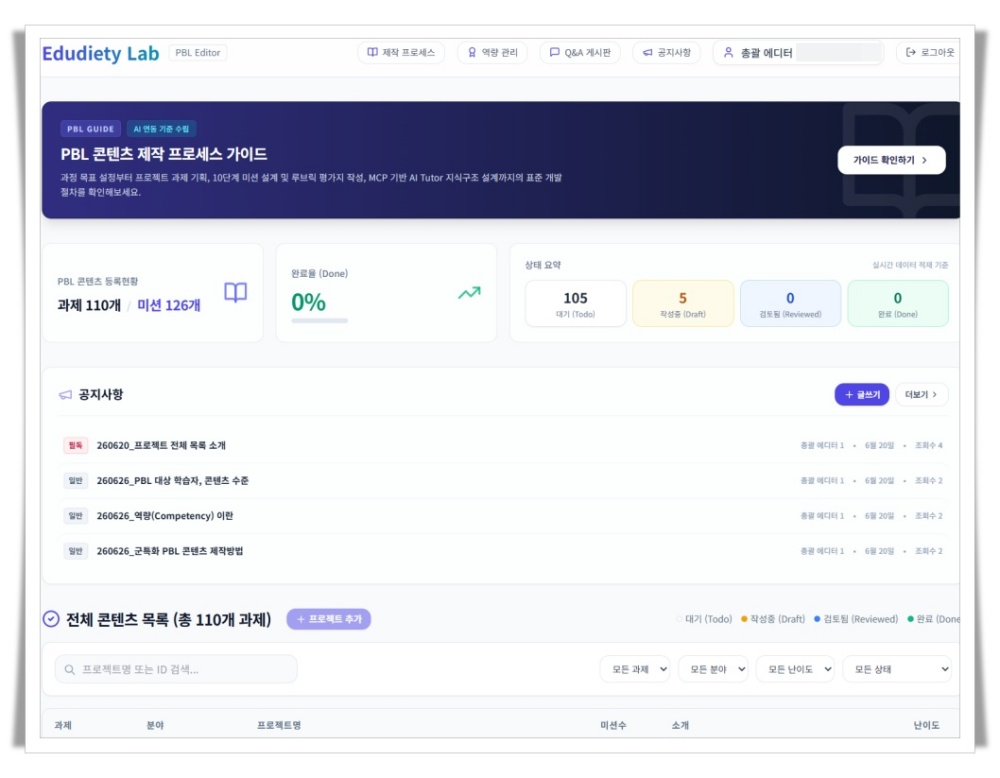
PBL 프로젝트 및 진도 대시보드

현황 분석
PBL CMS Dashboard

시스템에 등록된 전체 프로젝트들의 제작 단계(To-do, Draft, Reviewed, Done) 분포와 각 프로젝트의 주요 역량 지표 매핑 상태를 한 눈에 파악할 수 있는 통합 대시보드입니다.

02 / Mission Editor

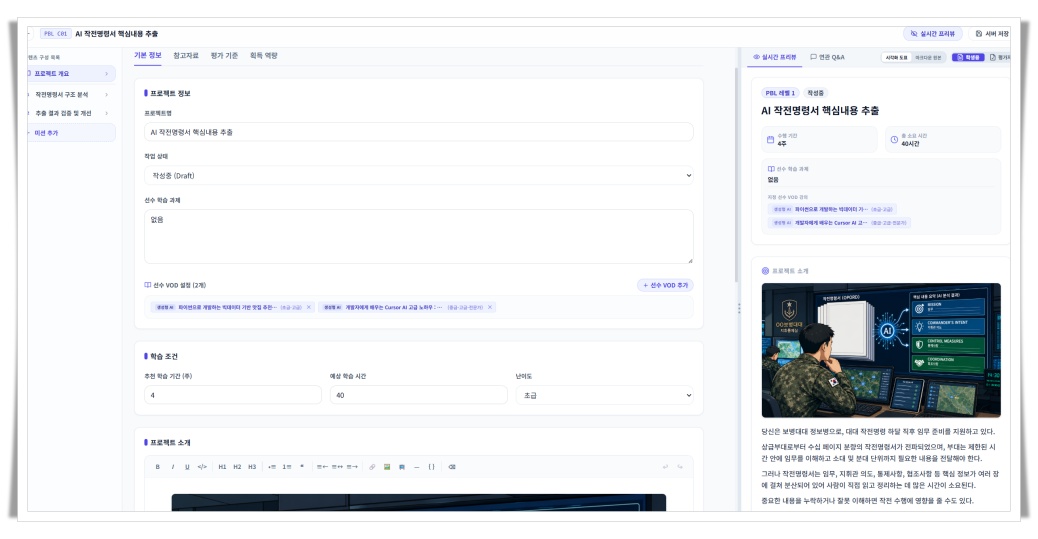
프로젝트 & 미션 저작 에디터

저작 환경
PBL CMS Editor

좌측 WYSIWYG 에디터(Tiptap)와 우측 실시간 마크다운/HTML 미리보기 탭을 활용해 세부 미션을 설계합니다. AI 출제 지원 도구와 연계하여 미션 시나리오 및 가이드라인 초안을 손쉽게 자동 생성할 수 있습니다.

제작 진도 및 통계 대시보드

전체 프로젝트 과제의 제작 현황과 상태 분포, 그리고 매핑된 역량 통계를 시각적으로 한 눈에 관리합니다.

Total Projects
11개

시스템에 등록되어 관리 중인 총 과제 수

Production Stage
105/5/0/0

제작 현황(To-do/Draft/Reviewed/Done)

AI Competency Map
100% 매핑

프로젝트 3대 역량 기준 매핑률

Rubrics Configured
94% 완료

미션별 동료 평가용 루브릭 완성율

대상 사용자

본 출제 관리시스템은 다양한 교육 현장에서 체계적인 PBL 콘텐츠 설계를 돕습니다.

🏫

대학교 (Universities)

전공 교과목에 맞춘 프로젝트형 과제와 3대 역량 기준을 설계하고 표준 템플릿에 맞추어 고품질 문제지를 출제합니다.

🧑‍🎓

초·중·고등학교 (Schools)

디지털 교과 과정과 연계된 소규모 모듈식 세부 미션을 구성하고, 동료 평가를 위한 간단한 루브릭을 제작합니다.

🏢

기업 교육 (Corporate Training)

직무 성과와 직결되는 실무 비즈니스 과제를 설계하고, AI 역량 진단 갭 분석용 정밀 루브릭 및 질문을 관리합니다.

출제 CMS 플랫폼의 장점

단순한 텍스트 에디터를 넘어, 체계적이고 표준화된 PBL 콘텐츠를 설계할 수 있게 하는 핵심 도구입니다.

1. 표준화된 PBL 템플릿 제공

가이드라인에 맞춰 빈 칸을 기입하는 것만으로도 초보 출제자 역시 교육 목적에 완벽하게 부합하는 프로젝트형 과제를 출제할 수 있습니다.

2. 촘촘한 3대 역량 매핑 시스템

AI활용역량, AI활용스킬, AI업무역량으로 명확히 구분된 3대 역량 프레임워크를 기반으로 프로젝트와 미션에 기여하는 역량을 유기적으로 관리합니다.

3. 실시간 미리보기 및 미디어 검증

수행 가이드에 포함된 이미지와 동영상이 학습자가 볼 실제 웹 환경에서 어떻게 표시되는지 저작과 동시에 즉각적으로 모니터링합니다.

4. 체계적인 4단계 제작 공정 대시보드

To-do, Draft, Reviewed, Done으로 이어지는 4단계 과제 생애주기를 기반으로 협업 중인 전체 콘텐츠 제작 파이프라인을 효율적으로 추적합니다.

PBL Content Authoring & Management System

PBL Content
Authoring CMS

Systematically manage the design and authoring process of PBL content for peer and community learning. From standard project templates to competency mappings, detailed missions, and rubrics—we provide an all-in-one environment for publishing educational assets.

Core Features

A comprehensive authoring toolkit designed to guide educators from project creation to validation and progress tracking.

1. Project-based Assignment Management

Provides a standardized template for project-based assignments. Following the step-by-step guidance naturally compiles complete, well-structured PBL assignments.

2. Competency Framework Mappings

Register and manage competencies. Maps activities to three dimensions: "Hard Skills" (handling AI), "AI Utilization Skills" (solving/planning), and "AI Business Competency" (achieving success).

3. Detailed Mission Builder

Subdivide complex projects into step-by-step detailed missions. Repeated, structured mission execution helps learners level up the target skills effectively.

4. Evaluation Form Integrated Management

Design rubric matrices for assessing submissions. Encourages dialogue between evaluators and learners, helping students check their skill gaps and receive feedback.

5. Production Progress Tracker

Assign four developmental stages: To-do, Draft, Reviewed, and Done to each assignment. Track active content pipelines via an integrated dashboard.

6. Real-time Preview

Instantly preview content on project and mission creation screens. Verify that illustrations, layout, and video clips display perfectly from the learner's perspective.

7. Mission-by-Mission Q&A Setup

Create and edit specific diagnostic questions that evaluators should ask. Asking uniform check questions across different participants ensures high consistency in evaluation.

PBL Content Authoring Workflow

A comprehensive pipeline from drafting templates and mapping skills to detailed missions, previews, and progress states.

📝
1. Register Template
Define project scope
🎯
2. Map Competencies
Select 3 skill dimensions
⚙️
3. Design Missions
Subdivide into milestones
📋
4. Build Rubrics
Write peer critique criteria
💬
5. Manage Q&A Qs
Add/remove check questions
👁️
6. Verify Layout
Check media on preview
📊
7. Track Stages
Follow To-do to Done lifecycle
🚀
8. Final Publish
Deploy worksheet and rubric

PBL Content Authoring Editor

A 3-pane authoring workspace to manage templates, map competency indexes, and coordinate draft states.

PBL CMS Workspace
Dashboard
Manage Projects
Competency Criteria
Detailed Missions
Evaluation Rubrics
Progress Dashboard
Q&A Settings
Project Template Editor

Generative AI-powered Marketing Content Creation

Reviewed

[Project Overview & Standard Template]

"Learners will leverage prompt engineering techniques to gather market research, generate copy variations, and assemble an AI-collaborative marketing project proposal."

🎯 Mapped Competency Mappings
Hard Skills: AI Prompt Control AI Utilization: Planning & Solving AI Business: Digital Strategy
⚙️ Detailed Missions
  • Mission 1: Conduct AI-assisted market research
  • Mission 2: Plan and draft targeted copy using LLMs
  • Mission 3: Run marketing forecasts and assemble reports
📋 Rubrics & Diagnostic Questions
  • Q1. Are AI prompt parameters configured correctly?
  • Q2. Does copy align with target segment statistics?
  • Q3. Did learners revise outputs based on peer critiques?
🤖 AI Authoring Assistant
Analyze parameters to auto-generate competencies and diagnostic check items.
Tip: Mission guide text is dynamically tailored depending on mapped competencies.

Production Progress & Analytics

Track project authoring pipelines, monitor stage counts, and review aligned competencies via modern analytics panels.

Total Projects
48

Total projects registered and active in the system

Production Stage
12 / 18 / 10 / 8

Project distribution across stages (To-do / Draft / Reviewed / Done)

AI Competency Map
100% Mapped

Completion rate for defining 3 skill tiers across assignments

Rubrics Configured
94% Set

Configuration rate for detailed peer assessment rubrics

Target Users

Our workspaces are optimized to support pedagogical authoring needs globally.

🏫

Universities

Design competency-focused course curriculum, author high-quality problem sets, and set up peer assessment criteria.

🧑‍🎓

Schools

Formulate bite-sized milestone activities mapping directly to digital textbooks and create simplified peer feedback guides.

🛡️

Military Education

Write mission-focused simulation guidelines, assign team milestones, and set unified rubrics for consistent instructor grading.

🏢

Corporate Training

Deploy real-world scenario challenges to evaluate core business competency levels, skill-gap indexes, and role-readiness metrics.

Why Choose This CMS

Key strengths differentiating our authoring CMS workspace from static document editors.

1. Standardized PBL Templates

Follow standardized prompt outlines. Fill out designated fields to construct high-quality, pedagogically sound project assignments easily.

2. 3-Tier Competency Mapping

Seamlessly associate objectives with Hard skills, AI utilization, and Business competencies to enforce skill alignments in missions.

3. Real-Time View & Media Checks

Instantly monitor how rich texts, custom images, and embedding videos look in the exact layout learners will use during their work.

4. 4-Stage Development Pipelines

Oversee massive course content creation processes across departments using To-do, Draft, Reviewed, and Done project states.